TU ANUNCIO / YOUR PUBLICITY

AQUÍ PODRÍA ESTAR TU ANUNCIO: / HERE COULD BE YOUR AD E-mail
Mostrando entradas con la etiqueta Investigation. Mostrar todas las entradas

viernes, 10 de mayo de 2019

Cálculo de vigas en Android / Calculation of beams in Android

Manual de cálculo de momentos flectores, cortantes y flechas con Android

Manual of calculation of bending moments, shear stresses and deflections with Android


El siguiente programa "Vigas-Beam" lo hemos creado para facilitar el cálculo de momentos flectores, cortantes y flechas en una viga cualquiera homogénea de una forma muy sencilla desde nuestro dispositivo Android.

The following program "Beam-Beam", we have designed for facilitate the calculation of bending moments, shear forces and deflections in any homogeneous beam from our device with Android operating system

Disponible aquí: / Available here:

https://play.google.com/store/apps/details?id=com.nieto.luis.viga_beam

Si se desea ver estas instrucciones a modo de video:
If you want to see these instructions video mode. (in Spanish):


Todo comienza pulsando sobre nuestro icono:
It all starts by clicking on our icon:

Permisos / Permissions


Emite informes que podremos compartir y resulta muy fácil acceder a los resultados. Éste es el motivo por el que necesita permisos de lectura / escritura.
Los datos se guardan en el directorio .../Documents/ABK_Vigas

It issues reports that we can share and it is very easy to access the results. This is why you need read / write permissions.
The data is saved in the directory .../Documents/ABK_Vigas


Descripcion / Description


Se nos abrirá la siguiente pantalla, donde podremos cambiar la longitud de la viga:
The following screen where you can change the length of the beam will open:


Añadir voladizos, si el apoyo es articulado: / Add cantilevers when it's symple supported: 


Cargas / Loads


Podemos ir añadiendo cargas (puntuales y repartidas) añadiendo el datos, según nos pregunte el programa de su localización.
We may be adding loads (point and distributed) by adding the data as the program ask us your location.

Cargas puntuales / Puntual Loads


Cargas repartidas / Distributed load
Pueden ser rectangulares, triangulares o trapezoidales
They can be rectangular, triangular or trapezoidal


Momentos / Moments


Cada vez que se coloque una carga nueva, esta aparecerá dibujada.
Each time a new load is placed, it appears drawn.

Insertar apoyo / Insert support
No hay límite en el número de apoyos extra a incorporar, pero, evidentemente, un número excesivo de éstos pueden ralentizar el cálculo
There is no limit on the number of extra supports to incorporate, but obviously, an excessive number of these can slow down the calculation


Cálculo / Calculation

Si pulsamos sobre el botón "Cálculo" hará los cálculos de momentos, cortantes y flechas. El valor definitivo de la flecha se conseguirá dividiendo ésta por EI (módulo de elasticidad x momento de inercia).
If we click on the "Calculation" button, it will calculate the moments, shears and deflections. The final value of deflections will be achieved dividing it by EI (modulus of elasticity x moment of inertia).

Una vez realizado el cálculo aparecerá un botón nuevo denominado "Informe":
Once the calculation performed a new button called "Informe" (Report) appears:

Si no se le hubieran dado los premisos de lectura/escritura nos aparecerá un diálogo indicándonos que no se puede guardar éste. En caso contrario:
If you have not been given read / write permissions, a dialog will appear indicating that you can not save it. Otherwise:


Si situamos el dedo sobre el dibujo el programa nos irá dando los datos puntuales de cada magnitud.
If we place your finger on the drawing, the program will give us the specific data for each magnitude.


Si pulsamos "Informe" se nos guardará la imagen y los valores de momentos, cortantes y flechas en un archivo csv, que podremos abrir con nuestra hoja de cálculo favorita:
If you press "Informe (Report)" we will save the image and values of moments, shear and arrows in a csv file, which can open with our favorite spreadsheet:


El aspecto de nuestro informe.csv con LibreOffice tendría este aspecto:
The aspect of our file informe.csv in LibreOffice looks like this:


Y, a partir de aquí, podremos presentar nuestros datos como nos convenga:
And, from here, we can present our data as we please:


Método de cálculo / Calculation method

D.F. me pidió que explicara el método utilizado para el calculo de los momentos, cortantes y flechas. Por ese motivo se expone este epígrafe.
D.F. Asked me to explain the method used for the calculation of moments, shear forces and deflections. For this reason this section is exposed.

El método de cálculo es aparentemente simple. Dado que:
The calculation method is apparently easy:

Partiendo de las cargas se van deduciendo cada unas de las funciones vinculadas (V, M, α, f) como integral por métodos numéricos de la anterior aplicando las condiciones de contorno (tipo de apoyos y su localización)
Starting from the loads, each of the linked functions (V, M, α, f) is deduced as integral by numerical methods of the previous one applying the boundary conditions (type of supports and their location)

martes, 20 de octubre de 2015

Cálculo aproximado de áreas con Android

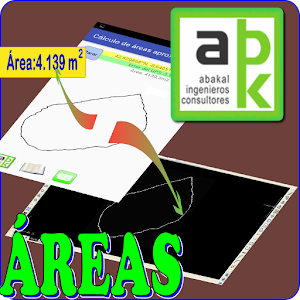
Puedes descargarte desde Play-Store de Google una aplicación en Android que nos permitirá medir áreas "in situ" con nuestro dispositivo Android y exportarlas a dxf (CAD)

You can download from Google Play-Store an Android application that will allow us to measure areas "in situ" with our Android device and export them to dxf (CAD)

Descargar programa


Instrucciones de uso:/Instructions for use:


La primera pantalla que nos aparecerá será la siguiente:

The first screen that will appear to us will be the following one


Obviamente deberemos tener GPS y estar activado. Si no ocurre esto el programa nos avisará.

Continuando. Pulsamos el botón GPS tal como nos indica el programa:

Obviously we must have GPS and this be enabled. If this does not happen the program will notify us.
Continuing. Press the GPS button as indicated by the program:


Conviene esperar hasta que se reduzca al máximo el error:
It is advisable to wait until the error was reduced to the maximum


Cuando tengamos un error decente pulsaremos en "Marcar" y empezaremos el paseo por el perímetro exterior de la parcela que queramos medir:
When we have a little mistake, press in "Mark" and begin the walk around the outside perimeter of the plot we want to measure:


Cuando le demos a parar nos aparecerá el siguiente mensaje:
When we press stop, the following message will appear:

Y en el directorio marcado estará nuestro archivo dxf por si quisiéramos usarlo en nuestro programa CAD:
And in the marked folder will be our dxf file in case we want to use it in our CAD program:


NOTAS:


Dado que es un método aproximado y depende de la exactitud del GPS de nuestro móvil, no hay que esperar milagros sólo una medida cercana a la realidad.

Campo abierto da mejores resultados que en medio de una ciudad. Los edificios interfieren con la señal del GPS.

Es recomendable andar despacio al recorrer el perímetro. Cuantos más puntos obtenidos se mejora la exactitud y además se le permite al GPS acertar mejor con la situación en dónde estamos.


NOTES:


It is an approximate method and depends on the accuracy of the GPS of our mobile, not to expect miracles only a measure close to reality.

Open field gives better results than in the middle of a city. Buildings interfere with the GPS signal.

It is advisable to walk slowly as you go around the perimeter. The more points obtained, the accuracy is improved and the GPS is also enabled to better match the situation where we are.


viernes, 16 de octubre de 2015

Sistema de información geográfica municipal en Android. Manual de instrucciones del Programa GIS-Local.

Con la intención de no eclipsar el resto de apps de Abakal en Google Play Store esta app se distribuirá bajo demanda. Si la desea, diríjase a nosotros utilizando la sección de contacto:


El programa GIS-Local está en Play-Store:
The GIS-Local program is in Play-Store:
https://play.google.com/store/apps/details?id=com.nieto.luis.gis_local_2

La funcionalidad básica consiste en la realización de un trazado rápido de una red de colectores, un inventario de mobiliario urbano, una distribución de puntos de luz y/o cualquier otra cosa trazable o contable en un municipio. Permite además la exportación de todos estos datos a un archivo de texto, kml (Google Earth) y dxf (CAD).
The basic functionality consists in the realization of a rapid tracing of a network of collectors, an inventory of urban furniture, a distribution of points of light and / or any other traceable or countable thing in a municipality. It also allows the export of all this data to a text file, kml (Google Earth) and dxf (CAD).

Primer paso LA ENVOLVENTE DE LOS DATOS / First step THE ENVELOPE OF THE DATA


El primer pantallazo del programa es el siguiente:
The first screenshot of the program is as follows:


Podremos elegir entre líneas y puntos. Si elegimos una de ellas, por ejemplo líneas. Aparecerá la segunda línea:
We can choose between lines and points. If we choose one of them, for example lines. The second line will appear:

Lo primero será crear un grupo (en el caso de haber escogido líneas, si hubiéramos escogido Puntos la opción se llamaría conjuntos). Este grupo se crea pulsando sobre Nuevo, se elimina pulsando sobre Elimina y se escoge eligiendo el grupo en el desplegable.
The first thing is to create a group (in the case of having chosen lines, if we had chosen Points the option would be called sets). This group is created by clicking on New, it is deleted by clicking on Delete and it is chosen by choosing the group in the dropdown.

Proceso de creación de grupo

El siguiente paso consiste en la creación de tramo para Líneas o subconjunto para Puntos.
The next step is to create a section for Lines or a subset for Points.


Y por último el subtramo o elemento:
And finally the sub-tranche or element:


Segundo paso EL MARCADO DE LOS DATOS / SECOND STEP MARKING THE DATA

Ahora se nos aparecerá el botón "Marcar" y podremos pulsar sobre el mapa (siempre que nuestro GPS esté activo)
Now the "Marker" button will appear and we will be able to click on the map (as long as our GPS is active)


Tras pulsar, el programa nos preguntará si queremos incorporar alguna información adicional. Y éste es el momento de hacerlo.
After pressing, the program will ask us if we want to include some additional information. And this is the time to do it.


Uno a uno se irán marcando los puntos en el mapa. En el diálogo anterior si hubiéramos pulsado "Cancelar" saldríamos del cuadro de diálogo sin que el programa hiciera nada. Si se hubiera pulsado "Eliminar" borraría el último punto creado.
One by one they will be marking the points on the map. In the previous dialog if we had pressed "Cancel" we would leave the dialog without the program did anything. If "Delete" was pressed, it would delete the last created point.

EL MARCADO AUTOMÁTICO / THE AUTOMATIC MARKING


Si se pulsa la opción "Automático el programa nos lanzará la siguiente pregunta:
If the "Automatic" option is pressed, the program will ask the following question:


Podremos elegir en que el marcado sea por tiempo (segundos) o en distancia (metros). La cantidad se puede modificar y por defecto nos propone 10 (metros o segundos). Si queremos parar y continuar con el método manual se vuelve a pulsar sobre el mismo "checkbox".
We can choose where the dialing is by time (seconds) or distance (meters). The quantity can be modified and by default it proposes 10 (meters or seconds). If we want to stop and continue with the manual method is pressed again on the same "checkbox".


Según se vayan creando los puntos se irán visualizando en la pantalla.
As they are created the points will be displayed on the screen.

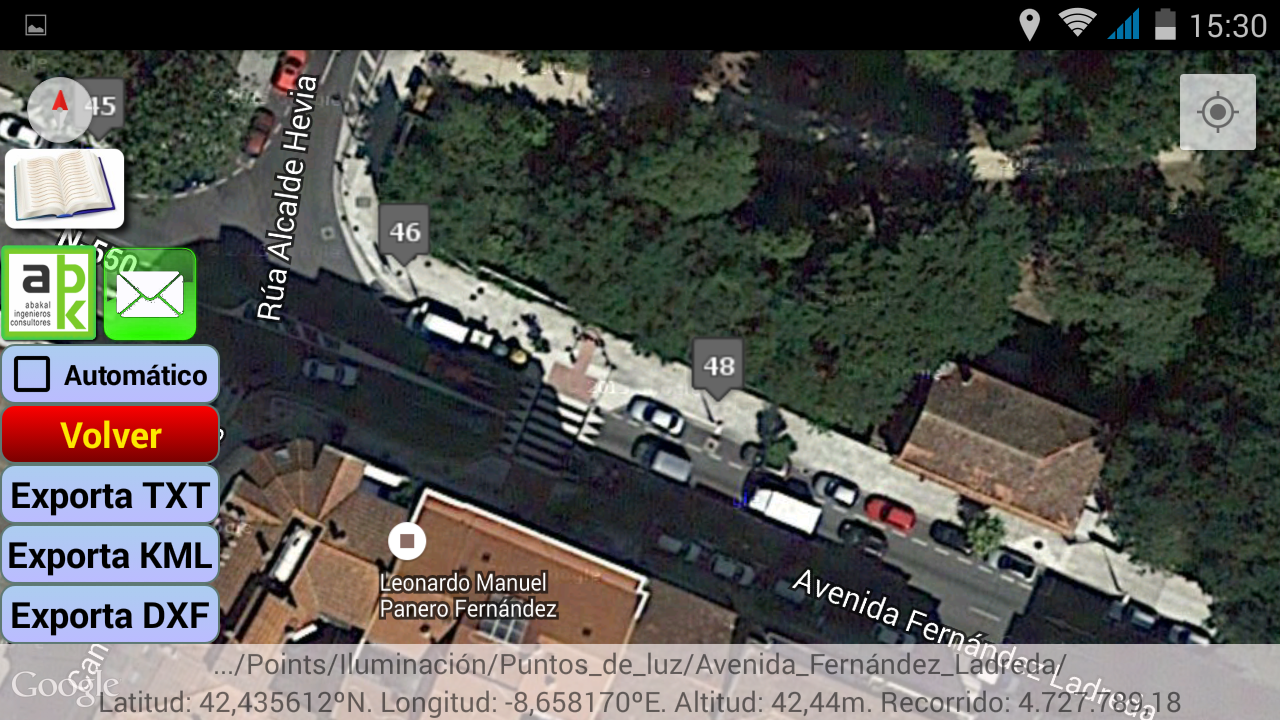
Un ejemplo en el caso de Puntos (Colocación de Puntos de luz, farolas)


An example in the case of Points (Placing of points of light, lampposts)


EXPORTACIÓN DE DATOS / EXPORT OF DATA

Si pulsamos sobre el botón "Exporta TXT" nos exportará los datos en formato de texto:
If we click on the "Export TXT" button we will export the data in text format:


Si pulsamos sobre el botón "Exporta KML" nos exportará los datos en formato de KML de Google Earth:
Clicking on the "Export KML" button will export the data in Google Earth KML format:


Si pulsamos sobre el botón "Exporta DXF" nos exportará los datos en formato de CAD:
If we click on the button "Export DXF" we will export the data in CAD format:


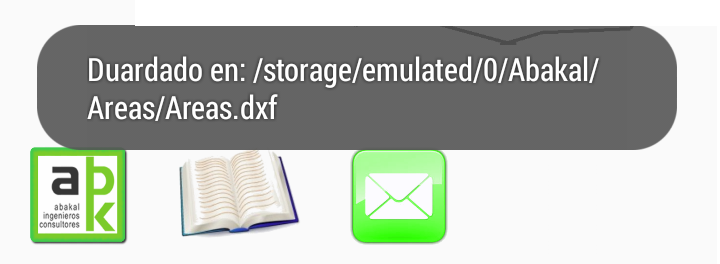
Un mensaje nos indicará donde han sido colocados estos archivos.
A message will tell us where these files have been placed.

martes, 15 de septiembre de 2015

Cálculo de momentos flectores, cortantes y flechas con Android

Manual de cálculo de momentos flectores, cortantes y flechas con Android
Manual of calculation of bending moments, shear stresses and deflections with Android


El siguiente programa "Vigas-Beam" lo hemos creado para facilitar el cálculo de momentos flectores, cortantes y flechas en una viga cualquiera homogénea de una forma muy sencilla desde nuestro dispositivo Android.

The following program "Beam-Beam", we have designed for facilitate the calculation of bending moments, shear forces and deflections in any homogeneous beam from our device with Android operating system

Disponible aquí: / Available here:

https://play.google.com/store/apps/details?id=com.nieto.luis.viga_beam

Si se desea ver estas instrucciones a modo de video:
If you want to see these instructions video mode. (in Spanish):


Todo comienza pulsando sobre nuestro icono:
It all starts by clicking on our icon:


Permisos / Permissions


Emite informes que podremos compartir y resulta muy fácil acceder a los resultados. Éste es el motivo por el que necesita permisos de lectura / escritura.
It issues reports that we can share and it is very easy to access the results. This is why you need read / write permissions.

Enpezando / Starting


Se nos abrirá la siguiente pantalla, donde podremos cambiar la longitud de la viga:
The following screen where you can change the length of the beam will open:


Añadir voladizos: / Add cantilevers:

Disponible a partir de la versión 5.2.0
Available from version 5.2.0

Podemos ir añadiendo cargas (puntuales y repartidas) añadiendo el datos, según nos pregunte el programa de su localización.
We may be adding loads (point and distributed) by adding the data as the program ask us your location.


Después de recibir varias peticiones, desde el 15 de julio de 2016 hemos incluido momentos a las acciones:
After receiving several requests, from the July 15, 2016, we have included moments to actions:


Cada vez que se coloque una carga nueva, esta aparecerá dibujada.
Each time a new load is placed, it appears drawn.


Una vez colocadas las cargas nos aparecerá un botón nuevo denominado "Cálculo". Si pulsamos sobre él hará los cálculos de momentos, cortantes y flechas. El valor definitivo de la flecha se conseguirá dividiendo ésta por EI (módulo de elasticidad x momento de inercia).
Once placed loads, a new button called "Cálculo" (Calculating) appears. If you click on, it will calculate moments, shears and deflections. The final value of deflections will be achieved dividing it by EI (modulus of elasticity x moment of inertia).

Una vez realizado el cálculo aparecerá un botón nuevo denominado "Informe":
Once the calculation performed a new button called "Informe" (Report) appears:


Si situamos el dedo sobre el dibujo el programa nos irá dando los datos puntuales de cada magnitud.
If we place your finger on the drawing, the program will give us the specific data for each magnitude.


Si pulsamos "Informe" se nos guardará la imagen y los valores de momentos, cortantes y flechas en un archivo csv, que podremos abrir con nuestra hoja de cálculo favorita:
If you press "Informe (Report)" we will save the image and values of moments, shear and arrows in a csv file, which can open with our favorite spreadsheet:


El aspecto de nuestro informe.csv con LibreOffice tendría este aspecto:
The aspect of our file informe.csv in LibreOffice looks like this:


Y, a partir de aquí, podremos presentar nuestros datos como nos convenga:
And, from here, we can present our data as we please:


Método de cálculo / Calculation method

D.F. me pidió que explicara el método utilizado para el calculo de los momentos, cortantes y flechas. Por ese motivo se expone este epígrafe.
D.F. Asked me to explain the method used for the calculation of moments, shear forces and deflections. For this reason this section is exposed.

El método de cálculo es aparentemente simple. Dado que:
The calculation method is apparently easy:

Partiendo de las cargas se van deduciendo cada unas de las funciones vinculadas (V, M, α, f) como integral por métodos numéricos de la anterior aplicando las condiciones de contorno (tipo de apoyos y su localización)
Starting from the loads, each of the linked functions (V, M, α, f) is deduced as integral by numerical methods of the previous one applying the boundary conditions (type of supports and their location)