TU ANUNCIO / YOUR PUBLICITY

AQUÍ PODRÍA ESTAR TU ANUNCIO: / HERE COULD BE YOUR AD E-mail
Mostrando entradas con la etiqueta Luis Antonio Nieto. Mostrar todas las entradas

jueves, 10 de septiembre de 2015

Carga puntual aproximada para el programa de android de cálculo de marcos


Dado que nuestra aplicación (Enlace anterior) nos da un cálculo rápido aproximado, en lugar de colocar el tren real de cargas colocamos una carga puntual mayorada equivalente. 

En el caso de partir de un marco pequeño cercano a la superficie nuestra carga mayorada equivalente sería de 600 KN será equiparable a una carga puntual de 100 KN (una rueda):


Para el caso de un marco pequeño a una distancia de la superficie entre 0.5 y 2,0 metros, la carga mayorada equivalente debería ser de 200 KN (un eje):


Para más de 3 a 6 m de profundidad la carga mayorada equivalente será de 400KN (dos ejes).


Para más de 6 metros ya estará influenciado por toda la carga (600KN)

Para marcos más grandes estas cargas equivalente se aceleran, Para marco de 4x4 metro y altura de tierras 0.5m. la carga mayorada equivalente será de 200 KN:


de igual modo, para 0,5 a 2.0 metros de profundidad serán 400KN y para más de 3.0 metros será aplicable la carga total como puntual de 600KN.

Para más de 6 metros de ancho en la losa superior es recomendable suponer toda la carga como carga mayorada puntual.

NOTA MUY IMPORTANTE: Todo esto es una aproximación para simplificar el cálculo dado que el objetivo del programa es lograr un cálculo rápido para comprobar en obra o realizar un primer prediseño.

NOTA 2: En otro tipo de normas donde la carga no sea el carro de 60 toneladas las cargas puntuales de cada rueda no será de 10 toneladas (100KN) sino de 3/2, 3.5/2 ó 14/2 toneladas correspondientes a vehículos de 32, 35 ó 40 toneladas.. Revisad la normativa de vuestro país y actuad con sentido común


lunes, 7 de septiembre de 2015

Manual del programa de calculo de marcos (y/o alcantarillas) de hormigón armado (o concreto reforzado)

Manual del programa de calculo de marcos (y/o alcantarillas) de hormigón armado (o concreto reforzado)
Instruction manual calculation program frames (and / or culverts) reinforced concrete

NUEVO PROGRAMA UNIFICADO CON LA APP DE MUROS Y MARCOS. VÉASE:
NEW UNIFIED PROGRAM WITH THE WALLS AND FRAMES APP. SEE:
https://carreteras-laser-escaner.blogspot.com/2019/03/calculo-de-muros-y-marcos-de-hormigon.html

Programa disponible en Google Play
Program available in Google Play

https://play.google.com/store/apps/details?id=com.nieto.luis.calculo_marco

Vídeo (en español)


Datos iniciales


Al abrir el programa aparecerá la siguiente pantalla:
When you open the program the following screen will appear:

Al pulsar sobre el dato (fondo azul) aparecerá el siguiente cuadro de diálogo:
By clicking on the data (blue background) the following dialog box will appears:


Donde podremos modificar el dato. Pulsando cambiar nos permitirá acceder al siguiente dato y pulsando salir saldemos de la cadena de diálogos:
We can modify the data. Pressing change will allow us to move to the next item and pressing us to repay out dialogues chain:


Y así hasta 18 preguntas relativas a las características de los materiales y a la definición geométrica del marco.
And so to 18 questions relating to the characteristics of the materials and the geometric definition of the frame.

Una vez concluida esta parte se procede al cálculo.
Once this part, we proceed to the calculation.

Cálculo de la estructura / Calculation of the structure


Ante la pantalla inicial y realizada la inserción de datos se pulsa el botón "Cargas"
Once the data insertion, the "Cargas" (Load) button will be pressed

Aparecerá la siguiente pantalla: Next window:

Nos aparece un aviso indicando donde se ha guardado el dibujo por si quisiéramos utilizarlo en un informe. En este gráfico están reflejadas las cargas a que está sometido el marco.
A notice indicating where you saved the drawing will appear. In this graph are the loadings.

NOTA: la carga inferior debemos compararla con la carga máxima admisible del terreno mayorada por el coeficiente de seguridad geotécnico. (NO OLVIDAR). Es una división tan simple que no ha sido resuelto por el programa.
NOTE: The bottom load must compare with the maximum permissible load of field factored by the coefficient of geotechnical safety. (DO NOT FORGET). It is such a simple division that has not been resolved by the program.

Dando después al botón "Momentos" aparecerá el diagrama de momentos de la estructura ya compensado éste en cada nodo:
After, giving the "Moments" button the moment diagram of the structure and compensated it on each node will appear:


Igual que en el caso anterior nos indicará donde se guarda el dibujo por si queremos usarlo en algún tipo de informe. Aparte de los momentos en los nudos aparecerán los momentos máximos negativos.
As in the previous case it indicates where the drawing is saved if we want to use it in some kind of report. Apart from the moments knots maximum negative moments will appear.

El siguiente paso es conocer la ley de cortantes:
The next step is to know the law of shear forces:


Como antes nos indica donde se guarda el dibujo. El código de colores de cargas, momentos y cortante siempre es azul-superior, verde-laterales y rojo inferior.
As before, it indicates where the drawing is saved. The color code loads, moments and shear is always blue-top; green-side; and bottom red.

El siguiente paso es el armado que está dividido en dos partes. En la primera parte se resuelve la cantidad de acero necesaria en cada parte.
The next step is the assembly that is divided into two parts. In the first part the amount of steel needed is resolved in each part.


Aparecerá la cuantía mínima de acero en cada parte de la estructura. La cuantía de cortante habrá que aumentarla en 1.41 veces si la disposición de la armadura no fuera a 45º.
The minimum amount of steel in every part of the structure will appear. The amount of shear will have to increase in 1.41 times if the arrangement of the armor was not at 45º.

Aparece un botón nuevo "¿?" si le pulsamos tendremos una tabla que pretende ser una chuleta de diferentes distribuciones de barras de acero. Los colores indican distribuciones parecidas.
A new button appears "¿?" if you click, we will have a table of different distributions of steel bars. The colors indicate similar distributions.

Si no deseamos hacer este cálculo el último paso "Despiece" nos permite ver un posible despiece. Está cuantificado de más ya que pretende ser lo más homogéneo para toda la estructura.
If you do not want to make this calculation the last step "Despiece" (Detailer) allows us to see a possible exploded.


Aparte de mostrar la distribución de las barras de acero. También nos indica la dotación de cortante. Si ésta  la colocamos horizontal o vertical (continuando como cercos la transversal) deberemos multiplicarla por 1,41. Se indica también la armadura transversal.
Apart from showing the distribution of steel bars. It also shows the shear strength. If this place it horizontally or vertically (continuing as the cross fences) we multiply by 1.41. transverse reinforcement is also indicated.

Ahora también aparece l botón "Informe". Este botón nos llevará al directorio donde se han guardado los gráficos.
Now the "Informe" (Report) button also appears. This button will take you to the directory where you saved the graphics.


Información adicional: / Additional Information:

El siguiente botón: / The next button

Nos llevará al presente manual de instrucciones.
It will take us to this manual.

Y el botón: / And the button:

Nos dará a conocer a nuestro patrocinador. Sin él, este programa no habría sido posible y ésta es la única publicidad del mismo.
We will announce our sponsor. Without it, this program would not had been possible.

viernes, 26 de junio de 2015

Reading data from files msg (Outlook) with VB6 / Lectura de datos de ficheros msg (de Outlook) con VB6

Vamos a exponer, no una sino 3 formas diferentes de poder obtener los datos de un fichero de formato msg de Outlook
Let's expose, not one but three different ways to get data from "msg" file format of Outlook.

Sistema 1: con la ayuda de EAGetMailObj / System 1: with the help of EAGetMailObj


Se incorpora como referencia de esta manera:
It is incorporated by reference in this way


Si no tenemos esta biblioteca se consigue instalando EASendMail:
If you do not have this library is achieved by installing EASendMail:

Se puede descargar el programa desde aquí:
You can download the program here:

También se puede buscar EASendMail y buscarlo por nuestra cuenta. Una vez instalado, ya tendremos este componente para nuestros programas de VB. Necesitamos instalarlo peno no hace falta usarlo. Lo importante es tener este grupo de bibliotecas dll:
You can also search EASendMail and look for ourselves. Once installed, we will have this component to our programs VB. Penile need to install needless use. The important thing is to have this group of dll libraries:

La función que necesitaremos será algo parecida a ésta:
The function we need is something like this:

Sub LeeMSG(ByVal msgF As String)
    Dim oCorreo As New EAGetMailObjLib.Mail
    oCorreo.LicenseCode = "TryIt"

On Error GoTo 100
 Dim texto As String
 texto = ""
 Dim previo As String
    oCorreo.LoadOMSGFile msgF
    Dim Destinatarios
    Dim i As Integer
    Dim Destinatario As EAGetMailObjLib.MailAddress
  
        'MOSTRANDO FECHA
        MsgBox oCorreo.SentDate

        'MOSTRANDO Remitente
        MsgBox oCorreo.From.Address

        'MOSTRANDO DESTINATARIOS
        Destinatarios = oMail.To
        For i = LBound(Destinatarios) To UBound(Destinatarios)
            Set Destinatario = Destinatarios(i)
            MsgBox Destinatario.Address
        Next
    
        'MOSTRANDOS CON COPIAS
        Destinatarios = oMail.Cc
        For i = LBound(Destinatarios) To UBound(Destinatarios)
            Set Destinatario = Destinatarios(i)
            MsgBox Destinatario.Address
        Next

        'MOSTRANDO ASUNTOS
         MsgBox oCorreo.Subject
  
       ' MOSTRANDO TEXTO DEL CORREO
       'MsgBox "Texto del correo: " & oCorreo.TextBody

       ' MOSTRANDO HTML body
       'MsgBox "CUERPO Html: " & oCorreo.HtmlBody
       'filecopy msgfiletexto+".msg"
    
       ' MOSTRANDO ADJUNTOS
       'Dim adjuntos
       'Dim adjunto As EAGetMailObjLib.Attachment

       'adjuntos = oCorreo.Attachments
       'For i = LBound(adjuntos) To UBound(adjuntos)
       '    Set adjunto = adjuntos(i)
       '    MsgBox "Adjuntos: " & adjunto.Name
       'Next

    Exit Sub
10:
    'MsgBox Err.Description
End Sub

Hasta aquí mostramos como obtener los datos y visualizarlos con un mensaje de texto pero es obvio que se puede hacer cualquier cosa con ellos.
Thus far we show how to obtain the data and view them with a text message but obviously you can do anything with them.

Sistema 2: Con la ayuda de msgtool.exe / System 2 With the help of msgtool.exe

Puedes descargarlo de: You can download from:


O simplemente buscando msgtools en Google.
Or just looking msgtools in Google.

Nos dará un comando para utilizar en linea:
This will give us a command to use:

                    msgtool -c origen.msg > destino.eml

Podría utilizarse la función Shell de VB. Al ser esta función asíncrona es posible que cuando quisiñeramos leer los datos del fichero de texto "eml" todavía no se hubiera creado. por ello utilizaremos la función Ejecutar:

Private Declare Function ShellExecute Lib "shell32.dll" Alias "ShellExecuteA" (ByVal hwnd As Long, ByVal lpOperation As String, ByVal lpFile As String, ByVal lpParameters As String, ByVal lpDirectory As String, ByVal nShowCmd As Long) As Long

Private Declare Function OpenProcess Lib "kernel32" (ByVal dwDesiredAccess As Long, ByVal bInheritHandle As Long, ByVal dwProcessId As Long) As Long

Private Declare Function GetExitCodeProcess Lib "kernel32" (ByVal hProcess As Long, lpExitCode As Long) As Long

Const STILL_ACTIVE = &H103
Const PROCESS_QUERY_INFORMATION = &H400

Public Sub Ejecutar(ByVal CmdLine As String)
On Error GoTo 20
Dim hProcess As Long
Dim RetVal As Long
hProcess = OpenProcess(PROCESS_QUERY_INFORMATION, False, Shell(Chr(34) + CmdLine + Chr(34), 7))
Do
    GetExitCodeProcess hProcess, RetVal
    DoEvents
Loop While RetVal = STILL_ACTIVE
Exit Sub
20 MsgBox "error"
End Sub

La segunda pega consiste en la decodificación UTF-8. Podríamos utilizar las siguientes funciones de codificación-decodificación:

Function isUTF8(ByVal ptstr As String)
    Dim tUTFencoded As String
    Dim tUTFencodedaux
    Dim tUTFencodedASCII As String
    Dim ptstrASCII As String
    Dim iaux, iaux2 As Integer
    Dim ffound As Boolean
    ffound = False
    ptstrASCII = ""
    For iaux = 1 To Len(ptstr)
        ptstrASCII = ptstrASCII & Asc(Mid(ptstr, iaux, 1)) & "|"
    Next
    tUTFencoded = "Ä|Ã…|Ç|É|Ñ|Ö|ÃŒ|á|à |â|ä|ã|Ã¥|ç|é|è|ê|ë|í|ì|î|ï|ñ|ó|ò|ô|ö|õ|ú|ù|û|ü|â€|°|¢|£|§|•|¶|ß|®|©|â„¢|´|¨|â‰|Æ|Ø|∞|±|≤|≥|Â¥|µ|∂|∑|∏|Ï€|∫|ª|º|Ω|æ|ø|¿|¡|¬|√|Æ’|≈|∆|«|»|…| |À|Ã|Õ|Å’|Å“|–|—|“|”|‘|’|÷|â—Š|ÿ|Ÿ|⁄|€|‹|›|fi|fl|‡|·|‚|„|‰|Â|Ú|Á|Ë|È|Í|ÃŽ|Ï|ÃŒ|Ó|Ô||Ã’|Ú|Û|Ù|ı|ˆ|Ëœ|¯|˘|Ë™|Ëš|¸|˝|Ë›|ˇ|Å |Å¡|¦|²|³|¹|¼|½|¾|Ð|×|Ý|Þ|ð|ý|þ|â‰|∞|≤|≥|∂|∑|∏|Ï€|∫|Ω|√|≈|∆|â—Š|⁄|fi|fl||ı|˘|Ë™|Ëš|˝|Ë›|ˇ"
    tUTFencodedaux = Split(tUTFencoded, "|")
    If UBound(tUTFencodedaux) > 0 Then
        iaux = 0
        Do While Not ffound And Not iaux > UBound(tUTFencodedaux)
            If InStr(1, ptstr, tUTFencodedaux(iaux), vbTextCompare) > 0 Then
                ffound = True
            End If
            If Not ffound Then
                tUTFencodedASCII = ""
                For iaux2 = 1 To Len(tUTFencodedaux(iaux))
                    tUTFencodedASCII = tUTFencodedASCII & Asc(Mid(tUTFencodedaux(iaux), iaux2, 1)) & "|"
                Next
                If InStr(1, ptstrASCII, tUTFencodedASCII) > 0 Then
                    ffound = True
                End If
            End If
            iaux = iaux + 1
        Loop
    End If
    isUTF8 = ffound
End Function

Function DecodeUTF8(s)
  Dim i
  Dim c
  Dim n
  s = s & " "
  i = 1
  Do While i <= Len(s)
    c = Asc(Mid(s, i, 1))
    If c And &H80 Then
      n = 1
      Do While i + n < Len(s)
        If (Asc(Mid(s, i + n, 1)) And &HC0) <> &H80 Then
          Exit Do
        End If
        n = n + 1
      Loop
      If n = 2 And ((c And &HE0) = &HC0) Then
        c = Asc(Mid(s, i + 1, 1)) + &H40 * (c And &H1)
      Else
        c = 191
      End If
      s = Left(s, i - 1) + Chr(c) + Mid(s, i + n)
    End If
    i = i + 1
  Loop
  DecodeUTF8 = s
End Function

Como el fichero "eml" es de texto simplemente es entretenido obtener la información con las clásicas funciones de text Right, Left, Mid y Replace.
As the file "eml" is text, it's just fun to get the information with the classic text functions Right, Left, Mid and Replace.

Solución 3: Con la biblioteca de Outlook / Solution 3: With the Outlook library.

Esta solución es la que menos me gusta porque es rendirse a Microsoft. Pero cuando todo lo demás falla y estamos obligados a trabajar con el formato msg. ¿Qué se puede hacer?


Añadimos en Referencias la biblioteca de Outlook e incorporamos el siguiente extracto de código donde queramos:
References add Outlook library and add the following code excerpt where we want:

Dim ol As Outlook.Application
Dim msg As Outlook.MailItem
Set ol = New Outlook.Application
Set msg = ol.CreateItemFromTemplate(eso)
    MsgBox msg.SenderEmailAddress
    MsgBox msg.ReceivedTime
    MsgBox msg.To
    MsgBox msg.Subject
...
Set ol = Nothing
Set msg = Nothing

En lugar de utilizar la función MsgBox para visualizar los datos podemos hacer cualquier otra cosa con estos datos.
Instead of using the MsgBox function to display data we can do anything with this information.

NOTA IMPORTANTE: Puede saltarlos este mensaje:
IMPORTANT NOTE: It can be shown this message:


Si no queremos que salga tendremos que abrir Outlook, >> Programador >> Seguridad de Macros >> Acceso mediante programación >> No avisarme nunca de actividad sospechosa.


Está claro que de nosotros si nos podemos fiar pero hemos dejado la puerta abierta para otros. CUIDADO, Como siempre en Microsoft, la seguridad es parcial.

It is clear that for us if we can trust but have left the door open for others. CARE, As always Microsoft, security is partial.


jueves, 11 de junio de 2015

Looking for a 3D crosslinking model II / Buscando un modelo 3D reticular II

Partiendo de nuestra red (ver entrada anterior: http://carreteras-laser-escaner.blogspot.com/2015/06/looking-for-3d-crosslinking-model.html)


Ejemplo con carga superior: / Top-loading example:


Hemos creado una red de 60x60
Cambiado las bielas por muelles
y, Colocado una carga uniforme en la parte central superior
We have created a network of 60x60
Rods changed by springs
and we've got a uniform load

Éste es el resultado:
This is the result:


El color rojo indica compresión, y el color azul tracción
Red color indicates compression and blue, traction

Cuando la carga es desmesurada:
When the load is very big:


Ejemplo forzando el punto central a un movimiento (creando una onda) / Example forcing the movement to a central point (creating a wave)


Ejemplo haciendo que todos los puntos tengan un pequeño desplazamiento aleatorio: /  Example making all the points have a small random offset:


En la próxima entrega complicaremos la red con diagonales ¿Qué ocurrirá?
Next time we complicate network with diagonals What will happen?


lunes, 8 de junio de 2015

Looking for a 3D crosslinking model / Buscando un modelo 3D reticular

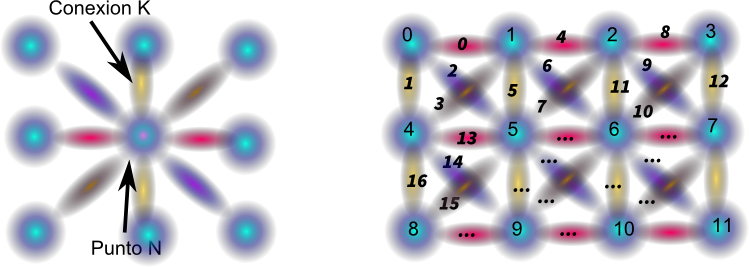
La idea es poder crear una red reticular, fácil de manipular por programación, para poder emular materiales reales. Sus características deben ser:
The idea is to create a mesh network, easily manipulated by programming, to emulate real materials. Its characteristics should be:


  1. La red de puntos se distribuirá en cuadrícula
  2. Cada punto tendrá un nexo con propiedades de unión
  3. Cada punto N tendrá varios puntos conectados. Uno por cada conexión:
  1. The network will be distributed at grid points
  2. Each point will have a link with binding properties
  3. Each point N will have a number of connected points. One for each connection:


Un punto, varias conexiones:
One point, several connections:


Un punto, varios puntos conectados. Uno por cada conexión:
A point, a number of connected points. One for each connection:

Aunque parezca secundario lo primero es adivinar cual es la correlación entre los puntos N y las conexiones K.
Although it may seem secondary, the first thing is to guess what is the correlation between N points and K connections.

El primer paso. Simplificando el problema. 2D: / The first step. Simplifying the problem. 2D:


NOTA: Se numeran los puntos en orden para hacer más fácil la programación de esta manera sólo hará falta un buche "FOR". También se podría haber nombrado los puntos como P[x,y] mucho más lógico desde el punto de vista "humano" pero más difícil a la larga desde el punto de vista informático.
NOTE: The points are numbered in order to make programming easier this way you will only need one "for" loop. I could have also named points as P [x, y] more logical from the "human" view point of, but more difficult from the IT perspective.

Para una red de w puntos de ancho y h puntos de altura:
El número de puntos será de w·h
Las conexiones serán (w-1)·h+(h-1)·w = 2·w·h-w-h.

For a network with wide of w points and height of h points:
The number of points will be w · h
The connections are (w-1) · h + (h-1) · w = 2 · w · hwh.

Para nuestro caso particular
For our particular case:

Biela 0 une punto 0 con 1.
Biela 1 une punto 0 con 4.
Biela 2 une punto 1 con 2.
Biela 3 une punto 1 con 5.
Biela 4 une punto 2 con 3.
Biela 5 une punto 2 con 6.
Biela 6 une punto 3 con 7.
Biela 7 une punto 4 con 5.
Biela 8 une punto 4 con 8.
Biela 9 une punto 5 con 6.
Biela 10 une punto 5 con 9.
Biela 11 une punto 6 con 7.
Biela 12 une punto 6 con 10.
Biela 13 une punto 7 con 11.
Biela 14 une punto 8 con 9.
Biela 15 une punto 9 con 10.
Biela 16 une punto 10 con 11.

Punto  0 conectado con: 4, 1.
Punto  1 conectado con: 5, 0, 2.
Punto  2 conectado con: 6, 1, 3.
Punto  3 conectado con: 7, 2.
Punto  4 conectado con: 8, 0, 5.
Punto  5 conectado con: 9, 1, 4, 6.
Punto  6 conectado con: 10, 2, 5, 7.
Punto  7 conectado con: 11, 3, 6 .
Punto  8 conectado con: 4, 9.
Punto  9 conectado con: 5, 8, 10.
Punto  10 conectado con: 6, 9, 11.
Punto  11 conectado con: 7, 10.

El algoritmo en VB para realizar las conexiones es:
The algorithm in VB for connections is:

Const nnn = 10000
Dim Px(nnn), Py(nnn) As Double
Dim b1(nnn), b2(nnn), P1(nnn), P2(nnn), P3(nnn), P4(nnn), Kmax, Nmax As Integer

----------

w = 4:h = 3:k = -1
Nmax = w * h - 1 '100 '(w - 1) * (h - 1)
For r = 0 To Nmax
i = r Mod w : j = Int(r / w)
  If (i <> w - 1) Then
    k = k + 1:    b1(k) = r:    b2(k) = j * w + (i + 1)
    Debug.Print "Biela " & Trim(k) & " une punto " & Trim(b1(k)) & " con " & Trim(b2(k)) & "."
    P3(b2(k)) = r:    P4(r) = b2(k)
  End If

  If j <> h - 1 Then
    k = k + 1:    b1(k) = r:    b2(k) = (j + 1) * w + i
    Debug.Print "Biela " & Trim(k) & " une punto " & Trim(b1(k)) & " con " & Trim(b2(k)) & "."
    P1(r) = b2(k):    P2(b2(k)) = r
  End If
Next r
Kmax = k - 1

For r = 0 To Nmax
    Debug.Print Replace("Punto  " & Trim(r) & " conectado con: " & Trim(P1(r)) & ", " & Trim(P2(r)) & ", " & Trim(P3(r)) & ", " & Trim(P4(r)) & ".", " ,", "")
Next r


El próximo día explicaremos como poner una carga y substituir bielas por muelles.
The next day we explain how to put a load and replace rods by springs.

http://carreteras-laser-escaner.blogspot.com/2015/06/looking-for-3d-crosslinking-model-ii.html


domingo, 7 de junio de 2015

How to make synchronous the Shell function / Cómo hacer sincrona la función Shell

A veces necesitamos que esté completamente ejecutado el programa que hemos llamado desde shell para poder seguir trabajando. Por ejemplo cuando este debe crear un archivo y queremos trabajar sobre el archivo ya creado.
Sometimes we need the program we have called from shell to continue working be completely executed. For example when you create a file and want to work on the file already created.

Para ello la mejor solución es no usar la función shell directamente. Nos crearemos nuestra propia función de lanzamiento de programas:
For this, the best solution is not to use directly the shell function. We create our own function launching programs:

Previamente definiremos estas funciones:
Previously we define these functions:

Private Declare Function OpenProcess Lib "kernel32" (ByVal dwDesiredAccess As Long, ByVal bInheritHandle As Long, ByVal dwProcessId As Long) As Long

Private Declare Function GetExitCodeProcess Lib "kernel32" (ByVal hProcess As Long, lpExitCode As Long) As Long
Const STILL_ACTIVE = &H103
Const PROCESS_QUERY_INFORMATION = &H400

_____________________________________________________________

Public Sub Ejecutar(ByVal Ordenes As String)
On Error GoTo 20

Dim hProceso As Long
Dim Terminado As Long
hProceso = OpenProcess(PROCESS_QUERY_INFORMATION, False, Shell(Ordenes, 7))
Do
    GetExitCodeProcess hProcesoTerminado
    DoEvents 'Esto permite esperar sin "colgar" el programa
Loop While Terminado = STILL_ACTIVE
Exit Sub

20 MsgBox "error"
End Sub


Dim ccc,tal as string
ccc=chr(34) ' carácter espacial comillas
tal = ccc & "C:\Ruta del programa\programa.exe" & ccc & " -a -b -c " & ccc & "parametro con espacios 1" & ccc & " " & ccc & "parametro con espacios2" & ccc
Open App.Path + "\pepa.bat" For Output As #1
        Print #1, tal
Close #1
Shell App.Path + "\pepa.bat",0


Lo cambiaremos a: / We will change it to:

Dim ccc,tal as string
ccc=chr(34) ' carácter espacial comillas
tal = ccc & "C:\Ruta del programa\programa.exe" & ccc & " -a -b -c " & ccc & "parametro con espacios 1" & ccc & " " & ccc & "parametro con espacios2" & ccc
Open App.Path + "\pepa.bat" For Output As #1
        Print #1, tal
Close #1
Ejecutar App.Path + "\pepa.bat"

Y ahora sí que hemos terminado con todos los problemas de espacios en blanco y sincronía.
And now we have finished with all the problems of blank spaces and sync.


sábado, 6 de junio de 2015

Solution of spaces in the path of the Shell Function in Visual Basic / Solucion definitova para los espacios en las rutas con la función Shell en Visual Basic

Cuando queremos que sea ejecutado un comando (o programa) de MSDOS desde nuestro programa de Visual Basic solemos recurrir a la función SHELL. De tal manera:
When we want a MSDOS command (or program) to be run from our Visual Basic program SHELL usually resort to function. Such a way:

programa.exe -a -b -c parametro1 parametro2

Escribiremos en nuestro programa:
We write in our program:

Shell  "programa.exe -a -b -c parametro1 parametro2",0

El problema reside cuando hay espacios en blanco:
The problem is when there are blanks spaces:

C:\Ruta del programa\programa.exe -a -b -c parametro con espacios 2 parametro con espacios 2

Está claro que esto no funciona ni en el terminal. Deberíamos escribir:
Clearly, this does not work or the terminal. We should write:

"C:\Ruta del programa\programa.exe" -a -b -c "parametro con espacios 2" "parametro con espacios 2"

Y esperamos que en nuestro programa podamos escribir:
And we hope that in our program we can write:

Dim ccc as string
ccc=chr(34) ' carácter espacial comillas
Shell  ccc & "C:\Ruta del programa\programa.exe" & ccc & " -a -b -c " & ccc & "parametro con espacios 1" & ccc & " " & ccc & "parametro con espacios2" & ccc,0

Si funciona hemos terminado con el problema.
If it works we have done with the problem.

Si no funciona ¿Qué está ocurriendo? ¿Porque funcionan las comillas en MSDOS, en la terminal y no funciona desde Shell.
Case of malfunction what is happening? Why the quotes work on MSDOS, in the terminal and does not work from Shell.

Solución definitiva / Ultimate solution


Esta solución deberíamos intentarla cuando todo sale mal porque es muy retorcida. Lo que haremos será crear un archivo .bat (archivo de procesamiento por lotes) y luego ejecutar éste desde Shell.
This solution should try it when everything goes wrong because it is so twisted. What we will do is create a .bat file (batch) and then run it from Shell.

Dim ccc,tal as string
ccc=chr(34) ' carácter espacial comillas
tal = ccc & "C:\Ruta del programa\programa.exe" & ccc & " -a -b -c " & ccc & "parametro con espacios 1" & ccc & " " & ccc & "parametro con espacios2" & ccc
Open App.Path + "\pepa.bat" For Output As #1
        Print #1, tal
Close #1
Shell App.Path + "\pepa.bat",0


Otro tema es la asincronía del programa Shell esto lo salvaremos en la siguiente entrega.
Another issue is the asynchrony of the Shell program. This will be saved in the next installment.


martes, 30 de diciembre de 2014

Dimensión fractal

Siguiendo con la dimensión fractal y definiendo sus coordenadas relativas lo mejor es empezar con un fractal de dimensión conocida, el fractal de Kock.

Following the study of the fractal dimension and defining their relative coordinates is best to start with a known fractal dimension, fractal de Kock


Para saber más, recomiendo ver: http://en.wikipedia.org/wiki/Koch_snowflake

Si se está interesado eh realizar este dibujo os dejo un programa sencillo para realizarlo:

To learn more, I recommend watching: http://en.wikipedia.org/wiki/Koch_snowflake

If you are interested in making this drawing I leave a simple program to do it:


Dim limi As Integer

Private Sub Command1_Click()
Picture1.ScaleHeight = 3
Picture1.ScaleWidth = 3
Picture1.Cls

For limi = 0 To 10
  Dibu 0, 1, 3, 1, 0
  SavePicture Picture1.Image, Trim(limi) & ".bmp"
  DoEvents
Next limi
End Sub

Sub Dibu(ByVal a As Single, _
         ByVal b As Single, _
         ByVal c As Single, _
         ByVal d As Single, _
         ByVal prof As Integer)

If prof > limi Then DoEvents: Exit Sub
Picture1.Line (a, b)-(c, d), QBColor(prof + 1)
u = (c - a) / 3:v = (d - b) / 3
p = a + u:q = b + v:r = a + u * 2:s = b + v * 2:pr = r / 2 + p / 2
qs = q / 2 + s / 2
uprqs = r - p:vprqs = s - q
u = -vprqs * 0.866025403784439 + pr:v = uprqs * 0.866025403784439 + qs
Dibu a, b, p, q, prof + 1:Dibu p, q, u, v, prof + 1
Dibu u, v, r, s, prof + 1:Dibu r, s, c, d, prof + 1

End Sub


De la página web anteriormente mecionada tenemos el valor de la dimensión:
From the above mecionada website have the dimension value:


                                     log 4/log 3 ≈ 1.26186

De las páginas nuestras anteriores podremos definir un punto de la forma:
From our previous pages can define a point of the form:

         OA = {(A1, A2, …, Ap), MMO}

En donde cada valor A será un entero entre 1 y 4 (ó 0 y 3) sin un número real para moverse en el segmento final porque la secuencia anterior es infinita
Where each value to be an integer between 1 and 4 (or 0 and 3) without a real number to move into the final segment, it's because the above sequence is infinite.


En la figura superior: In the upper figure: OA = {(2, 1, 3, 3, ...)}

Cuando se añade un elemento más de la sucesión {0..3} (4 elementos nuevos), se decrementa la longitud en 1/3p. Resulta lógico que la dimensión fractal sea log(elementos nuevos)/log(razón de decremento) = log(4)/log(3) = 1.26186...

When an element of the sequence {0..3} (4 new items) is added, the length is decremented by 

1/3p. It is logical that the fractal dimension is log (new items) / log (ratio decrease) = log (4) / log (3) = 1.26186 ...


En los casos anteriores de las tatispirales / In previous cases of tatispirales:
       OA = {(0 .. ∞, 0 .. ∞, ..., 0 .. ∞p), 0 ..   max_lp}
   max_lp = (R0/4p)·e-ksSAi es la longitud del elemento en el último punto de la sucesión del elemento "P". Si . Esto hace más difícil encontrar su dimensión / is the length of the element at the last point of the sequence of "P" element. therefore, it becomes harder to find your size.