TU ANUNCIO / YOUR PUBLICITY

AQUÍ PODRÍA ESTAR TU ANUNCIO: / HERE COULD BE YOUR AD E-mail
Mostrando entradas con la etiqueta Muro-Calc. Mostrar todas las entradas

viernes, 22 de marzo de 2019

Cálculo de muros y marcos de hormigón armado con Android / Calculation of reinforced concrete walls and frames with Android


En esta nueva versión se han unificado los programas de cálculo de muros y marcos de hormigón armado con la intención de simplificar el número de programas.
In this new version the programs of calculation of walls and frames of reinforced concrete have been unified with the intention of simplifying the number of programs.

Su icono es éste:
Its icon is this:


Y su enlace es el siguiente:
And its link is the following:

Al abrir el programa por primera vez pedirá permiso para poder guardar los informes en su dispositivo.
When you open the program for the first time, it will ask for permission to save the reports on your device.

Este programa consta de dos partes. La primera, dedicada al cálculo de muros y la segunda, dedicada al cálculo de marcos.
This program consists of two parts. The first, dedicated to the calculation of walls and the second, dedicated to the calculation of frames.


Si se deseara ver un vídeo de la aplicación este sería su enlace:

https://youtu.be/4ZYtLqRv5dg


Primera parte. Cálculo de muros
First part. Walls calculation


Pulsando sobre los textos en azul podremos cambiar los valores de las variables (21 en total)
Clicking on the blue text we can change the values of the variables (21 in total)

12 variables son de tipo "característico" (parte inferior con forma de tabla) y 9 de tipo geométrico (gráfico de la parte superior).
Una vez cambiada una se puede modificar el siguiente o salir de la edición.

 12 variables are of characteristic type (Shaped bottom table) and 9 of geometric type (graphic from the top).
Once you change one, you can modify the next one or exit the edition.


Botón CALCULARCALCULAR button


Pulsado el botón CALCULAR, el programa calculará los esfuerzos a tener en cuenta para el cálculo así como los coeficientes de seguridad frente al deslizamiento y al vuelco.
Entonces el botón CALCULAR pasa a denominarse ARMADO.

Pressing the CALCULATE button, the program will calculate the efforts to be taken into account for the calculation as well as the safety coefficients against slip and roll.
Then the CALCULATE button is renamed REINFORCE.


Botón ARMADOREINFORCE button


Pulsado el botón ARMADO, el programa calculará la armadura del alzado y de la zapata.
Entonces el botón ARMADO pasa a denominarse CÁLCULO, como al inicio y aparece el botón INFORME.

Pressing the REINFORCE button, the program will calculate the necessary steel.
Then the REINFORCE button is again called CALCULATE, as at the beginning, and the REPORT button appears..


Botón INFORMEREPORT button


Pulsado el botón INFORME, el programa crea un archivo de téxto con los datos y el cálculo en la ruta .../Abakal/Muro/Muro.txt. Además, aparecerá un diálogo por si se desea visualizarlo.

Pressing the REPORT button, the program creates a text file with the data and the calculation in the path .../Abakal/Muro/Muro.txt. In addition, a dialog will appear if you want to view it..

Botón IDIOMALANGUAJE button


Pulsado el botón IDIOMA, el programa variará español / inglés.
Press the LANGUAGE button, the program will change Spanish / English..


Segunda parte. Cálculo de marcos
Second part. Frames calculation


Pulsando sobre los textos en azul podremos cambiar los valores de las variables (18 en total)
Clicking on the blue text we can change the values of the variables (18 in total)

11 variables son de tipo "característico" (parte inferior con forma de tabla) y 8 de tipo geométrico (gráfico de la parte superior).
Una vez cambiada una se puede modificar el siguiente o salir de la edición.

 11 variables are of characteristic type (Shaped bottom table) and 8 of geometric type (graphic from the top).
Once you change one, you can modify the next one or exit the edition.

Botón CARGAS

LOADS button


Pulsado el botón CARGAS, el programa calculará las cargas equivalentes en el marco
Entonces el botón CARGAS pasa a denominarse MOMENTOS.

Pressing the LOADS button, the program will calculate the equivalents efforts.
Then the LOADS button is renamed MOMENTS.


Botón MOMENTOS

MOMENTS button


Pulsado el botón MOMENTOS, el programa calculará los momentos a los que está sometida la estructura
Entonces el botón MOMENTOS pasa a denominarse CORTANTES.

Pressing the MOMENTS button, the program will calculate the equivalents efforts.
Then the MOMENTS button is renamed SHEAR.


Botón CORTANTES

SHEAR button


Pulsado el botón CORTANTES, el programa calculará los esfuerzos cortantes a los que está sometida la estructura
Entonces el botón CORTANTES pasa a denominarse ARMADO.

Pressing the SHEAR button, the program will calculate the equivalents efforts.
Then the SHEAR button is renamed REINFORCE

.

Botones ARMADO y DESPIECE

REINFORCE & BREAKDOWN button


Pulsado el botón ARMADO, el programa calculará las áreas mínimas de armado en cada posición
Pulsado el botón DESPIECE, el programa calculará posibles cuantías de armaduras a elegir
Entonces el botón ARMADO pasa a denominarse DESPIECE. Y, pulsando éste volverá al inicio visualizando el botón INFORMES

Pressing the REINFORCE button, the program will calculate the equivalents efforts.
Pressing the button BREAKDOWN, the program will calculate possible amounts of steel to choose.
Then the REINFORCE button is renamed BREAKDOWN. And, pressing this one will return to the beginning visualizing the REPORTS button


En este momento estará visible el botón "¿?". Presionando sobre él aparecerá un cuadro de posibles correlaciones entre áreas u cuantías de acero.
At this moment the "¿?" Button will be visible. Pressing on it will appear a table of possible correlations between areas or amounts of steel.


Botón INFORMEREPORT button


Pulsado el botón INFORME, el programa crea varios archivos de dibujo con los datos del cálculo en la ruta .../Abakal/Marcos. Además, aparecerá un diálogo por si se desea visualizarlo.

Pressing the REPORT button, the program creates several drawing files with the calculation data in the route ,,,/Abakal /Marcos. In addition, a dialog will appear if you want to view it..


Botón IDIOMALANGUAJE button


Pulsado el botón IDIOMA, el programa variará español / inglés.
Press the LANGUAGE button, the program will change Spanish / English..


El icono inferior (el libro) redirigirá al aplicación a estas instrucciones.

The lower icon (the book) will redirect the application to these instructions.


miércoles, 6 de mayo de 2015

Examples for APP slope stability calculation / Ejemplos para el programa de calculo de estabilidad de taludes.

Para probar el programa "Estabili" he recogido unos pocos ejemplos comparándolos con otros sistemas de cálculo.

Ver también: http://carreteras-laser-escaner.blogspot.com/2015/05/app-slope-stability-calculation-for.html

Ejemplo 1:


El archivo ".est" contendrá la siguiente información:

0;0!20;10

0.0
0.0
0.0
0.0
0;0!0;7!10;7!15;3!20;3!20;0

10.0
32.0
20.0
0.6248693519093267


0.0
0.0
0.0
0.0


0.0
0.0
0.0
0.0


0.0
0.0
0.0
0.0


0.0
0.0
0.0
0.0


0.0
0.0
0.0
0.0


0.0
0.0
0.0
0.0


0.0
0.0
0.0
0.0


Y el resultado será:


Como vemos, el hecho de que se curve menos en la cabecera baja el coeficiente de seguridad de 2.17 a 1.67.

Ejemplo 2:


El archivo ".est" contendrá la siguiente información:

0;0!24;10

0.0
0.0
0.0
0.0
0;0!0;8!10;8!20;3!24;3!24;0

2.0
33.0
17.0
0.6494075931975098


0.0
0.0
0.0
0.0


0.0
0.0
0.0
0.0


0.0
0.0
0.0
0.0


0.0
0.0
0.0
0.0


0.0
0.0
0.0
0.0


0.0
0.0
0.0
0.0


0.0
0.0
0.0
0.0


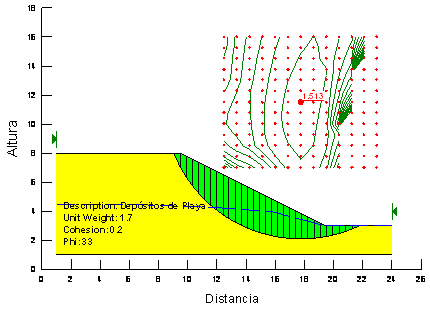
Y el resultado será:


El CS de 1.51 con el método de Bishop corresponde al CS de 1.35 con nuestro método de parábolas.

Ejemplo 4


El archivo ".est" contendrá la siguiente información:

0;4!30;18

0.0
0.0
0.0
0.0
0;0!0;16!9;16!24;6!30;6!30;0

10.0
34.0
19.0
0.6745085168424257
0;0!0;6!30;6!30;0

1000.0
0.0
0.0
0.0


0.0
0.0
0.0
0.0


0.0
0.0
0.0
0.0


0.0
0.0
0.0
0.0


0.0
0.0
0.0
0.0


0.0
0.0
0.0
0.0


0.0
0.0
0.0
0.0


Y el resultado será:


El CS de 1.757 pasa a ser de 1.40 para nosotros.

Ejemplo 5

El archivo ".est" del  terraplén mostrado en el ejemplo del vídeo contiene la siguiente información:

-40;-20!80;55
Fondo
0.0
0.0
0.0
0.0
0;0!40;40!42;40!4;0
Escollera colocada
0.0
55.0
22.5
1.4281480067421115
42;40!47;40!12;0!4;0
Pedraplen
0.0
45.0
21.5
0.9999999999999983
47;40!60;40!65;35!12;0
Todo-uno
10.0
45.0
18.0
0.9999999999999983
-40;-20!0;0!4;0!65;35!85;50!85;-20!-40;-20
Terreno natural
40.0
45.0
18.0
0.9999999999999983


0.0
0.0
0.0
0.0


0.0
0.0
0.0
0.0


0.0
0.0
0.0
0.0


0.0
0.0
0.0
0.0


Y el resultado será:


A partir de ahora, lo interesante es empezar comprando con otros programas sus distintos resultados.


domingo, 3 de mayo de 2015

APP slope stability calculation for Android / Manual del programa de calculo de estabilidad de taludes para Android

En Google-Play

https://play.google.com/store/apps/details?id=com.luisnieto.estabili&hl=en

Para ver ejemplos:

http://carreteras-laser-escaner.blogspot.com.es/2015/05/examples-for-app-slope-stability.html

Introduction / Introducción


The following program calculates slope stability. It used a similar method to that of the circles.
El siguiente programa realiza el cálculo de estabilidad de taludes. Emplea un método parecido al de los círculos.

Good articles associated with this topic are:
Buenos artículos relacionados son los siguientes:


Improving the system of segments, based on circles, through parables / Mejora del sistema de dovelas basado en círculos a parábolas


Parabolas instead of circles are used because the breakage is more realistic. Before curving the sliding base; in a normal slope, it breaks on its head more rectilinear shape. The calculation will give us a somewhat lower coefficient of safety.
Se utilizan parábolas en vez de círculos porque la rotura es  más realista. Antes de curvarse el deslizamiento en la base, en un talud normal, se rompe en su cabecera de forma más rectilínea. El cálculo nos dará un coeficiente de seguridad algo menor.

La rotura con forma de parábola es más realista y conduce a coeficientes de seguridad algo
 menores
The break with a parabolic shape is more realistic and safety factors leads to rather lower
La ruptura con una forma parabólica es más realista. El factor de seguridad obtenido es algo menor.


The division into segments is the same as the method of circles.
La división en dovelas es de igual manera que el método de círculos.

The balance of forces is the same as in the method of circles
El equilibrio de fuerzas es el mismo que en el método de círculos

Program performance / Funcionamiento del programa


After clicking on the program icon,
Tras pulsar sobre el icono del programa,


it opens with the following main screen:
éste se abre con la siguiente pantalla principal:


Pressing the first icon (open folder) the first dialogue that allows us to open and save files appears. we will press open:
Pulsando el primer icono (carpeta abierta) aparece el primer diálogo que nos permite abrir y guardar archivos. Pulsaremos abrir:


We can navigate through the different folders. By default, the program will create the directory Abakal, company that sponsors the program:
Podemos navegar por los diferentes directorios. Por defecto el programa creará el directorio Abakal, empresa patrocinadora del programa:


When we decide what will be the selected file, we will press the "Open (Abrisr)" button and draw the defined profile in the file:
Una vez decidido cual será el archivo seleccionado se le dará al botón "Abrir" y se dibujará el perfil definido en el fichero:


The following icon will give way to the edition. We can delete all data and leave all the variable to the initial values as the beginning of the program (click "new" - Nuevo). You can also take an example values available in the program (advisable when you start) (click "Example" - Ejemplo). In this case we will choose "Edit" - Editar.
El siguiente icono dará paso a la edición. Podremos elegir entre borrar todos los datos y dejar todas las variable a "cero", como al inicio del programa. También se pueden tomar los valores de un ejemplo disponible en el programa (aconsejable cuando se empieza). En éste caso optaremos por "Editar".


Clicking on the [0] ... [8] buttons we have access to the background and the 8 possible different materials that can make up the profile.
Pulsando sobre los botones [0]...[8] tendremos acceso al fondo y a los 8 posibles materiales diferentes que pueden componer el perfil.

The layer [0] defines the boundaries of the drawing (background). In this case the boundary coordinates (-40, -20) to (80.55)
La capa [0] define los límites del dibujo. En este caso las coordenadas límites son (-40,-20) hasta (80,55)


Presentation of the layer [1]: / Presentación de la capa [1]:


Presentation of the layer [2]: / Presentación de la capa [2]:


Presentation of the layer [3]: /  Presentación de la capa [3]:


 Presentation of the layer [4]: / Presentación de la capa [4]:


Presentation of the layer [5]: (empty, without coordinates, this means that no material)
Presentación de la capa [5]: (Vacío, sin coordenadas, significa que no hay material)


Clicking on the data, it will turn red, indicating that it is editable. If we give the button after saving the data will be modified. To avoid typos numeric keypad incorporated. "|" Will produce a line break, ";" separator coordinates, "<" wiped off the last character.
Pulsando sobre el dato, éste se pone de color rojo e indica que es editable. Si después le damos al botón guardar el dato será modificado. Para evitar errores tipográficos se incorporan la botonera numérica. "|" producirá un salto de línea, ";" separador de coordenadas, "<" borrado del último carácter. 


The sprocket gives way to the operators. The "Drawing" -Dibujo- option will draw:
La rueda dentada abre paso a los operadores. La opción "Dibujo" dibujará:


The option "Calculation" - Cálculo - will calculate:
La opción de "Cálculo" calculará:


If the discretization is very small device takes to create the matrix base. If the following message appears to us. We give "Wait" and wait a few seconds.
Si la discretización es muy pequeña el dispositivo tardará en crear la base matricial. Si se nos aparece el siguiente aviso. Le damos a "Esperar" y esperaremos unos pocos segundos más. 


We see the process in a video: /  Veamos el proceso en un vídeo:


Resultado final:


A copy of the original drawing is saved on your device:
Una copia del dibujo inicial se guarda en nuestro dispositivo:


A copy of the final drawing and the result is stored in your device:
Una copia del dibujo final y resultado se guarda en nuestro dispositivo:


The dx (discretized band width) dimension can be editable and changeable from the button under the sprocket:
La dimensión dx (ancho de la franja discretizada) puede ser editable y modificable desde el botón debajo de la rueda dentada:

Different discretizations and bad results are displayed when "dx" is too large.
Se muestran diferentes discretizaciones y malos resultados cuando "dx" es demasiado grande.


If you click on the icon Abakal, this will take us to the website of the program sponsor.
Si pulsamos sobre el icono de Abakal nos llevará a la página web del patrocinador del programa.


Definition of slopes / Definición de taludes


A special section of the program is the explanation of how they should define and enter the data for the program knows how to perform the initial drawing. This step is very important because not only draw but also creates two-dimensional matrix that defines the model.
Un apartado especial del programa es la explicación de como se deben definir e introducir los datos para que el programa sepa como realizar el dibujo inicial. Este paso es muy importante porque no sólo dibuja sino que crea la matriz bidimensional que define el modelo.


Thus it is easy to see that we put the first layer, the jetty, is the polygon coordinates:
De esta manera es fácil ver que la primera capa que ponemos, la escollera, sigue el polígono de coordenadas: 
0,0
40,40
42,40
4,0

NOTE: If a layer cap to an earlier, fully or partially, the remaining data is the most superior, as would be shown in the drawing.
NOTA: Si una una capa tapa a otra anterior, total o parcialmente, El dato que queda es el más superior, tal como quedaría reflejado en el dibujo.

DAta files / Archivos de datos


The data file is read through files with the extension ".est". They are text files. For the above example, the file is as follows:
El archivo y lectura de datos se hace a través de archivos con la extensión ".est". Son archivos de texto. Para el ejemplo tratado el archivo es de esta forma:

-40;-20!80;55
Fondo
0.0
0.0
0.0
0.0
0;0!40;40!42;40!4;0
Escollera colocada
0.0
55.0
22.5
1.4281480067421115
42;40!47;40!12;0!4;0
Pedraplén
0.0
45.0
2.15
0.9999999999999983
47;40!60;40!65;35!12;0
Todouno
10.0
45.0
18.0
0.9999999999999983
-40;-20!0;0!4;0!65;35!85;50!85;-20!-40;-20
Terreno natural
30.0
45.0
18.0
0.9999999999999983


0.0
0.0
0.0
0.0


0.0
0.0
0.0
0.0


0.0
0.0
0.0
0.0


0.0
0.0
0.0
0.0

Clearly, the decimal point is set to a point (". "), the coordinates separated with an exclamation point (which will be changed to a line break in the application "!") And the semicolon (";") separates the X of Y.
Queda claro que el punto decimal está definido con un punto ("."), el separados de coordenadas con un signo de admiración ("!" que serán cambiado a un salto de línea en la aplicación) y el punto y coma (";") separará la X de la Y.

Seen from a tablet: / Visto desde una tablet:


The same program run on a tablet looks like this:
El mismo programa ejecutado en una tablet tendrá este aspecto:


Un vídeo de todo este tema es:


Vea también : http://carreteras-laser-escaner.blogspot.com/2015/05/examples-for-app-slope-stability.html